























Understanding Device Identifiers: Model Name, Model Number, & Serial Number
Below is a table that explains the differences between Model Name, Model Number, and Serial Number
| Term | Description | HP Example | Lenovo Example | Dell Example |
|---|---|---|---|---|
| Model Name / Product Name | The marketing name that identifies the product line or series, representing the device family. | HP EliteBook 840 G9 | ThinkPad X1 Carbon 7th Gen | Latitude 5520 |
| Model Number / Product Number | A specific alphanumeric identifier that distinguishes the exact version or configuration. | 6RH28PA | 20QDA00QAU | Latitude 5520 |
| Serial Number | A unique alphanumeric code assigned to each individual unit for precise identification. | 5CG10689AP | SN12345678 | BCH6PL3 |
How It Works: Your Guide to Using EMPR RAPID
EMPR RAPID makes finding the right spare part for your device fast and simple. Follow the steps below to get started and make the most out of our intelligent parts finder.
Step-by-Step Guide
1. Enter Your Device Details
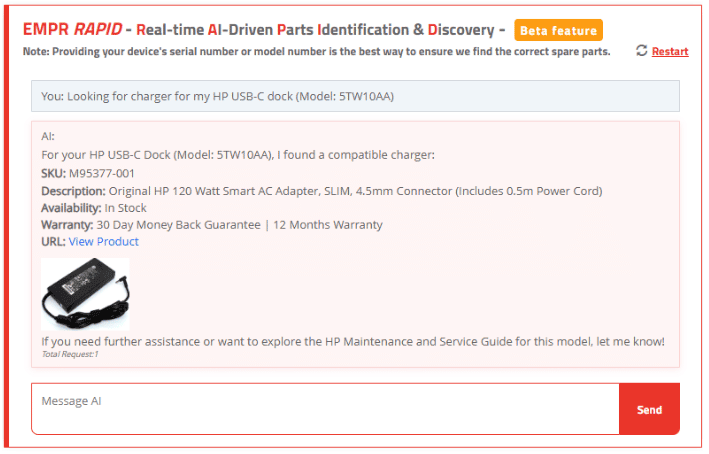
Begin by providing the essential details about your device. For the most accurate results, include your device's model number or serial number. This level of specificity ensures that our system locates the exact spare part for your device.
2. Our AI Gets to Work
Once you submit your device details, our advanced AI algorithm analyses the information. It compares your query with our extensive database of spare parts using machine learning techniques to identify the best match for your device.
3. Review Your Options
The system will display a list of compatible spare parts along with detailed information. You can compare options based on compatibility, features, and availability to ensure you choose the perfect match.
4. Select & Proceed
After reviewing the options, click on the part that best suits your needs. You'll be guided through the next steps, whether it’s getting more details, checking pricing, or placing an order.
5. Need Assistance?
If you have any questions or need further help, our support resources and customer service team are available to guide you through the process.
Frequently Asked Questions
Q: What if I don't know my device's serial or model number?
A: If you're unsure, check your device’s label or manual. Accurate details are key to finding the right part.
Q: Why is providing the model number better than the device name?
A: The model number allows our system to pinpoint the exact spare part for your specific device. Using only the device name might return general parts for a series. For example, while the EliteBook 850 series may use both 65Wh and 45Wh batteries, the EliteBook 850 G9 specifically requires a 65Wh battery.
Q: Where can I get more help if needed?
A: Our support team is available to assist you. Check our Help Center for additional guides or contact customer support directly.
